More than a title
Add people, locations and notes to your activities. Open map directions when you need them.
Work has deadlines. Life has plans. Your ideas deserve a place, too. ELIO brings tasks, meetings, notes and routines into one clear view—so you can see what matters and take the next step.
For iPhone and iPad · iOS / iPadOS 18+
Including outer-screen and unfolded layouts for iPhone Duo.
A meeting belongs to a project. A task involves a person. A good idea might become a goal. Personal life and business keep crossing paths, even when the tools you use keep them apart.
ELIO was created to bring those connections into one calm, practical workspace. Not to fill every minute, but to help you understand your commitments, keep the useful details close and make room for what comes next.
Start small. Capture the thought. Choose a next step. Adjust when life changes. Then notice what you accomplished.
Four familiar places for planning, organizing, capturing and reflecting. Move between them with ELIO’s capsule navigation.
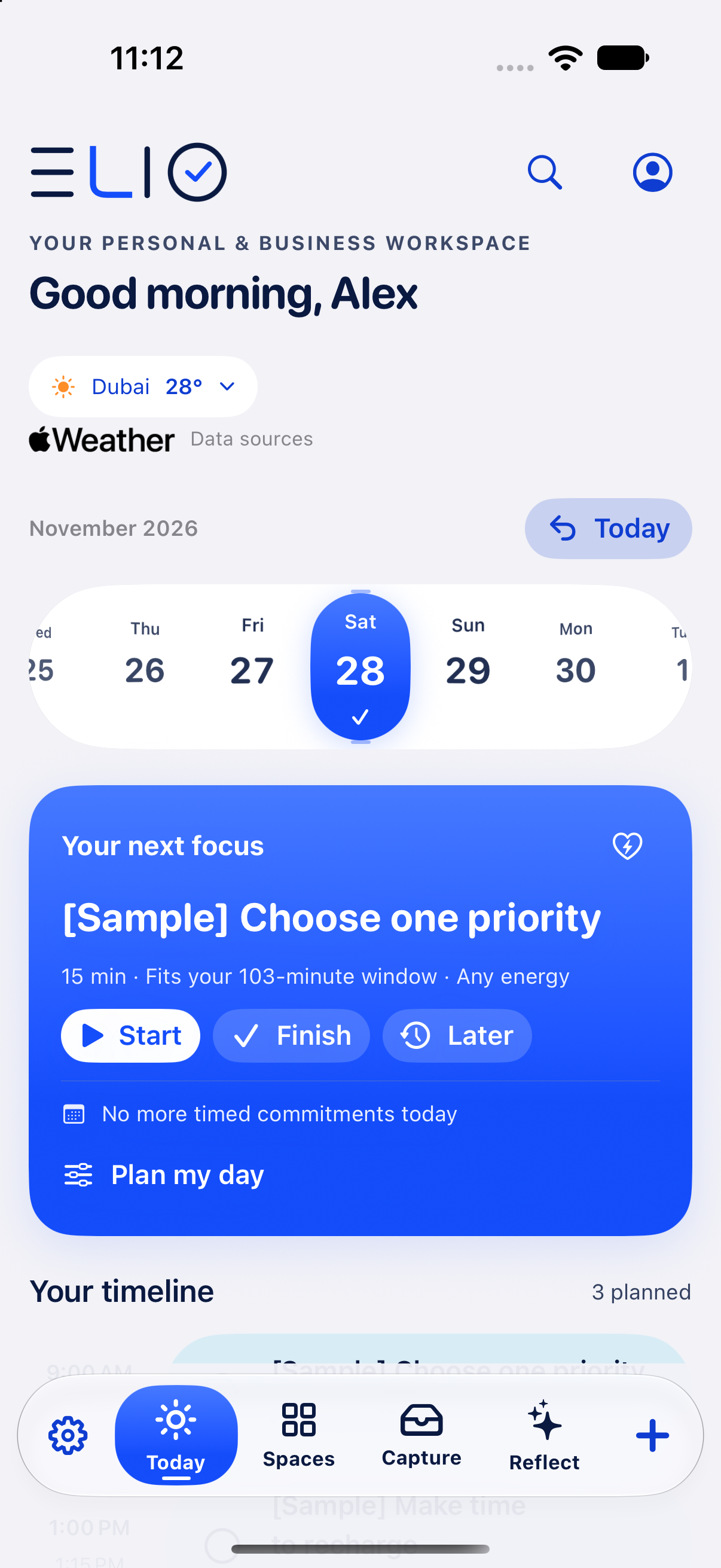
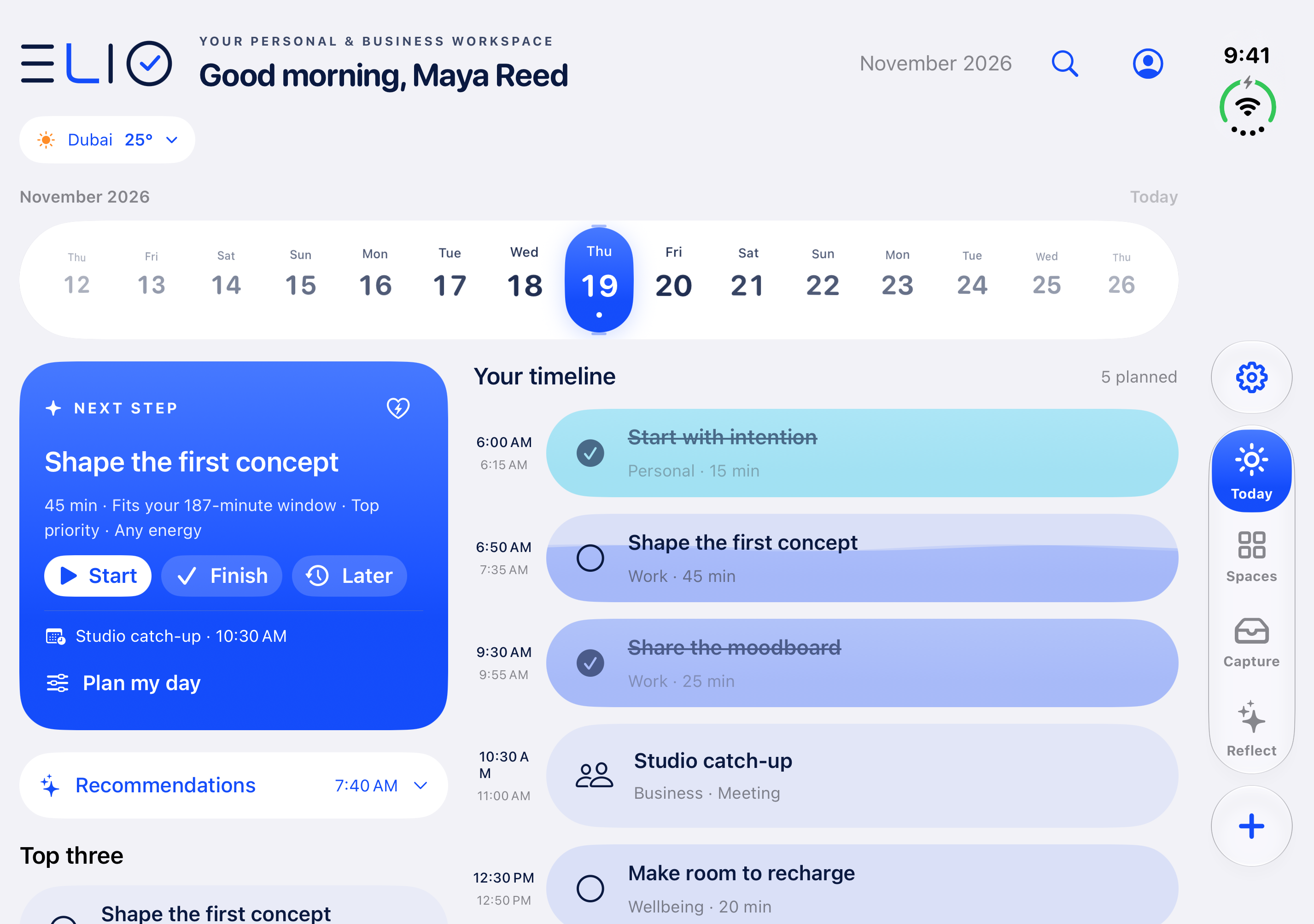
See your next focus and the shape of your day. Time-filled capsules make ongoing activities easy to spot.
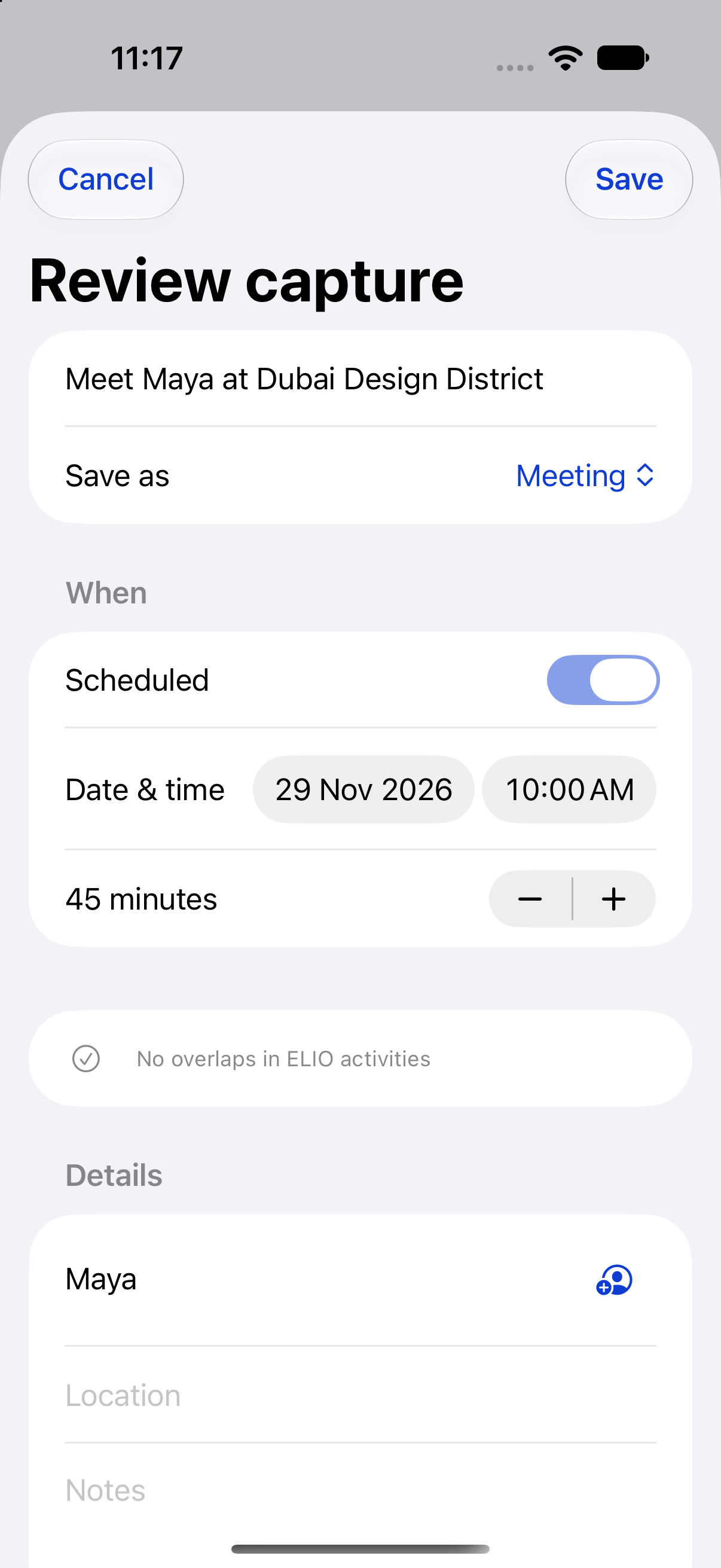
Put an idea into words. Review its time, person and details before saving it as a task or meeting.
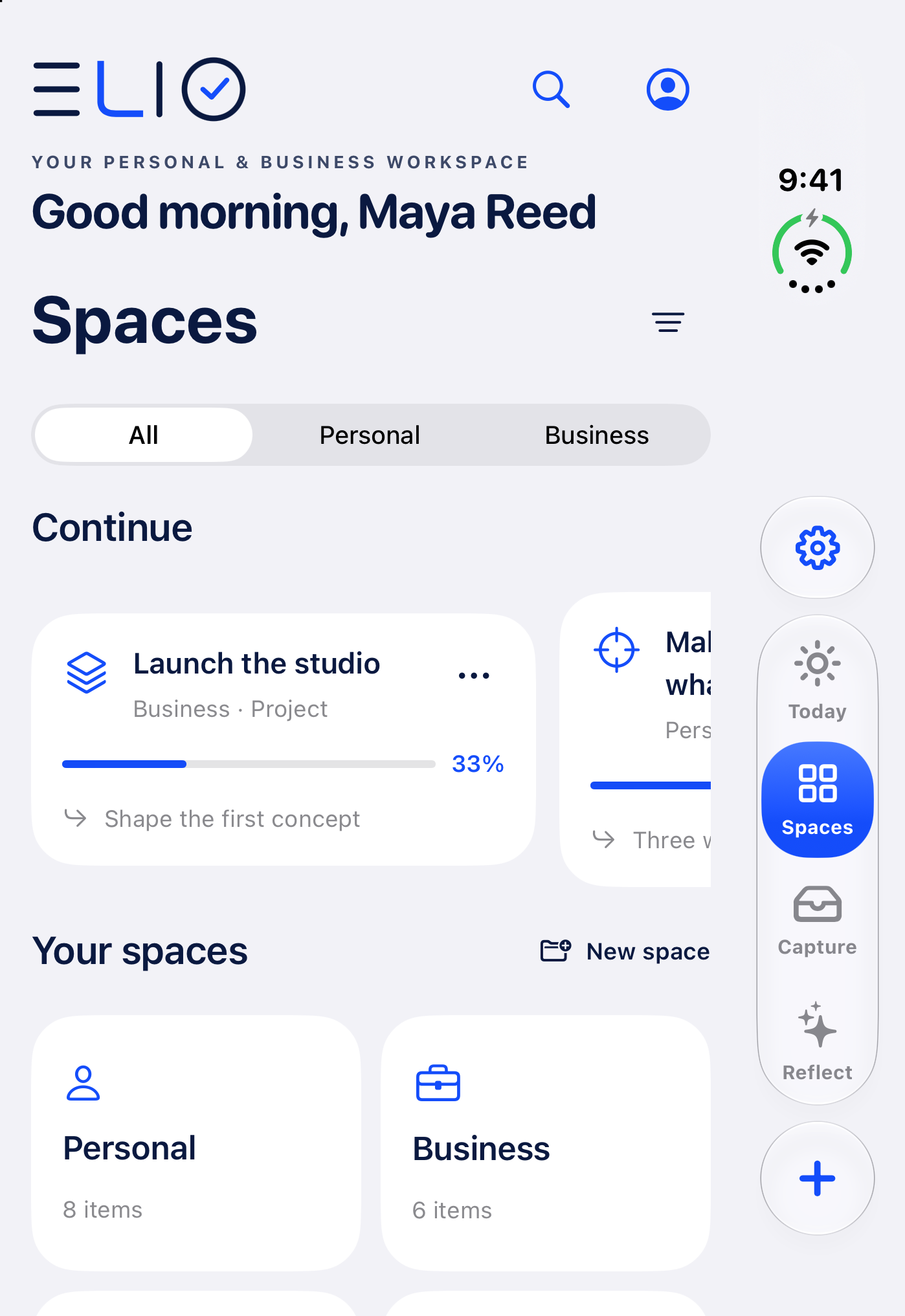
Give personal and business projects, notes, goals and habits a place that makes sense.
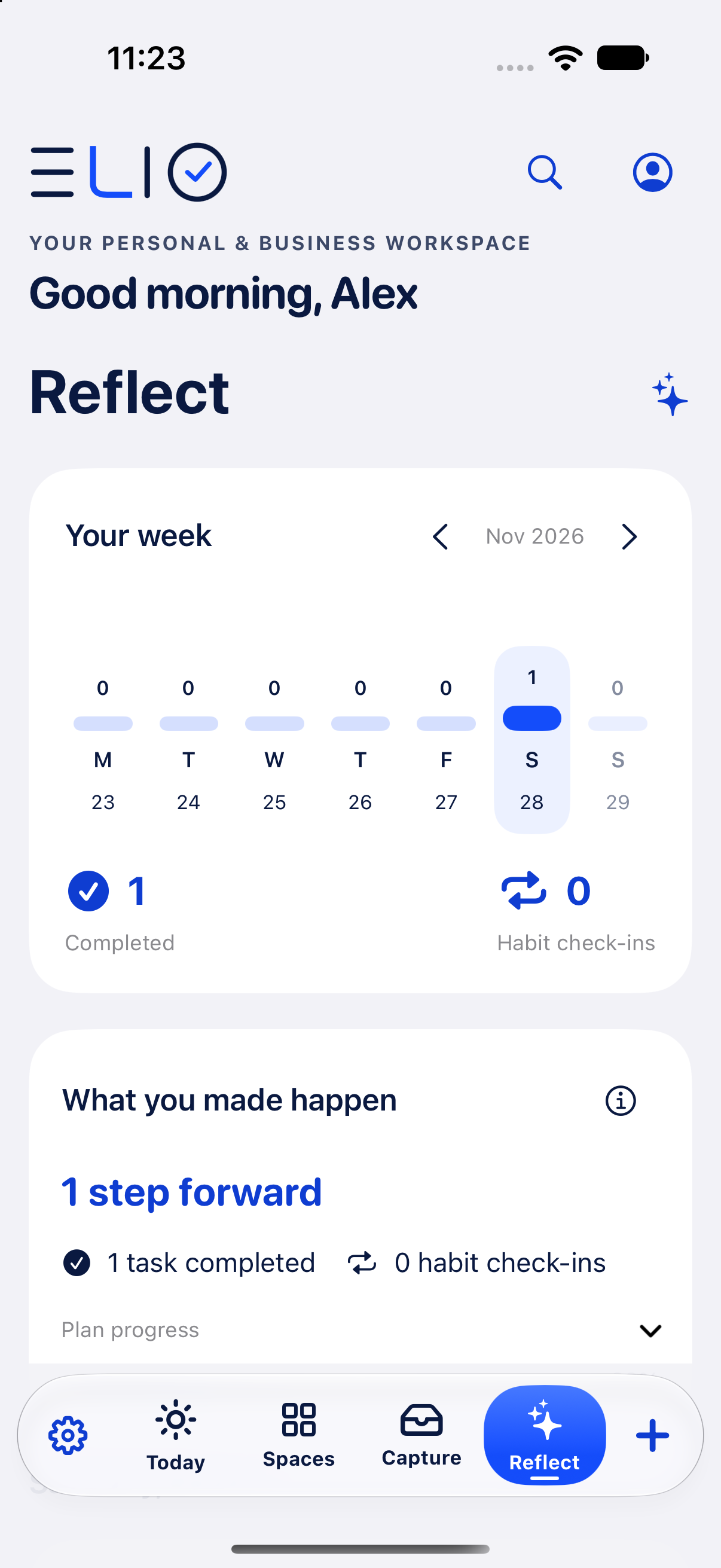
Recognize completed steps and habit check-ins. Learn from your day without chasing a perfect score.
Actual app captures with fictional demo data. Spaces and unfolded previews show an earlier beta; details may differ from the release build. Tap a screenshot to inspect it.
Add people, locations and notes to your activities. Open map directions when you need them.
Choose device calendars or optional read-only Google and Microsoft connections.
Keep a focus timer, weather and your next activity nearby. Open Apple Music to choose what plays.
Light, Dark or System appearance. Optional clicks, haptics and Calm motion.
ELIO adapts across compact iPhone screens and spacious iPad layouts. iPhone Duo includes outer-screen and unfolded views, bringing your next focus and timeline together when you open the phone.
Requires iOS or iPadOS 18 or later. Layouts adapt to the available screen; individual device experiences may vary.
iPhone Duo unfolded layout · Earlier beta preview with fictional activities.
48 seconds · Closed, unfolded, partially open, seated and landscape Desk Mode—with a tent-mode visualization.
Closed: use the compact outer display for quick planning. Unfolded: see your next focus and timeline together. Partly open: ELIO adapts as the phone folds. Seated: the inner display adjusts to portrait. Landscape: Desk Mode shows your greeting, weather, next focus and music control. Tent mode: a staged visualization uses the actual ELIO landscape Desk Mode display.
Actual ELIO build 1.0 (8) with fictional demo data. Device views are simulator renders. The tent shot is a staged device visualization using the real Desk Mode interface, rather than a physical-device recording.
See ELIO on an iPhone, with the full device in view. Captioned films use the actual app interface; no sound required.
30 seconds · The idea behind your workspace.
Download introductionYour whole day together, on iPhone. See your next step on Today. Review the meeting details and any schedule overlap before saving. Keep personal and business activities organized in Spaces. Reflect on the steps you completed. Explore the guide or request a TestFlight invitation.
72 seconds · From first plan to daily reflection.
Download guided tourStart on Today and choose one manageable next step. In Capture, review the title, date, duration and any overlap before saving. Open a personal or business space to find its activities. Settings brings together your profile, insights, appearance and backup options. In Reflect, notice completed steps and habit check-ins. Save a private backup to Files through Backup & recovery. Start with one activity; the written guide covers connections, widgets and Desk Mode.
Silent, captioned videos show actual ELIO views inside Apple’s iPhone simulator hardware renders. Demo names and activities are fictional. These are device presentations, not footage filmed with a camera, and do not demonstrate a live sign-in or purchase.
Practical instructions for your first day and the settings you’ll want to know.
Want to explore first? Settings → Try a sample day gives you demo activities to inspect. Demo people and events are fictional.
Use the date capsule to move between days. Your next focus and capsule timeline bring scheduled activities into view. The fill of an activity capsule represents its elapsed time; it is a visual guide, not a time-tracking report.
Tap an activity to inspect its details. Swipe a supported task capsule right for Edit or Delete. When the day changes, review your plan before moving commitments. Plus subscribers can use Rescue my day to review a proposed revised schedule before applying it.
For notes, habits, goals and projects, use the create menu and select the type you want. Each type has its own details.
Keep personal and business work organized with projects, goals, routines, meetings and notes. Open a project to review its related activity. Give records useful details instead of forcing everything into a task title.
Swipe a supported capsule right for Edit and Delete. For a recurring habit, open its details to review the recurrence and stop future occurrences when the routine is no longer useful. Keep a backup before removing important records.
Review completed tasks, habit check-ins and your daily accomplishments. Use reflections to record what helped and what you want to change. A daily score describes recorded progress; it does not measure your value or require every day to be full.
Choose a small next step for tomorrow rather than carrying an unrealistic list forward.
Calendars: Settings → Calendar connections offers device calendars and direct Google or Microsoft sign-in. Authorize an account, choose visible calendars and refresh when needed. Direct provider connections are read-only. Google verification is in progress, and organizational Microsoft policies may limit access.
Contacts: Settings → Phone contacts lets you review access. Use a contact picker when adding a person to an activity; permission is optional.
Locations: add a location to your activity, then use the available map action to open directions. Check the destination in Apple Maps or Google Maps.
Weather: choose a city in Settings → Weather and enable the Today or Desk Mode display. ELIO uses the selected city rather than requesting GPS location.
Open Settings → Open Desk Mode for a focused display of the time, greeting, weather and next activity. Use its focus timer when you want a defined work session. Choose display options under Connections & display; you can hide task titles or keep the screen awake. Personal photo backgrounds require Plus.
The music control opens Apple Music so you can choose playback. Available playback information depends on Music access and the current playback state.
To add a widget, use your iPhone’s Home Screen widget picker, search ELIO and choose Up Next. It shows the next scheduled item. Done is available for tasks, not meetings; tapping it opens ELIO to complete the task. Widget refresh timing is controlled by iOS.
Settings includes Light, Dark and System appearance, Haptic feedback, Click sounds and Calm motion. Open Reminders to review notification access and run a test. Sound and vibration also depend on iOS, Focus, volume and haptic settings.
Everyday planning stays free. Both Plus plans unlock the same extras.
Free
Your free features and saved records remain available if Plus ends.
$3.99 USD / month
No advertised monthly trial.
$29.99 USD / year
7-day trial on the yearly plan for eligible new subscribers.
Available with the App Store release. Local prices and trial eligibility appear in the app and Apple’s purchase confirmation.
Subscriptions renew automatically unless canceled. An eligible yearly trial converts to the full yearly price unless you cancel at least 24 hours before it ends. Manage or cancel through your Apple Account. Use Restore purchases in ELIO Plus with the same Apple Account.
Manage Apple subscriptions · Apple Standard Terms of UseELIO 1.0 is submitted and waiting for Apple’s review. The public download link will be added here after approval and release.
Status checked 28 November 2026. ELIO is not yet available for public App Store download.
Want to help shape what comes next? Request an invitation to try available beta builds and share feedback before future updates.
Request TestFlight accessInvitation required. Build approval, tester capacity and expiry apply. TestFlight is the beta channel, separate from the public release.
ELIO 1.0 has been submitted to Apple and is currently waiting for review. Public downloads will be available after approval and release. This page will show the App Store download link when the app is live.
Yes, you can request an invitation by email. TestFlight is the separate beta channel for trying upcoming builds and sharing feedback. Access depends on an available approved build and tester capacity. A request is not an automatic invitation; beta builds can change and expire.
ELIO supports iPhone and iPad running iOS or iPadOS 18 or later, with layouts for compact and wide screens. It also includes outer-screen and unfolded layouts for iPhone Duo. A supported operating system is required; this is not a claim that every device model has been individually tested.
Create and organize tasks, meetings, notes, habits, projects and goals. Free also includes calendar connections, reminders, widgets, reflections, daily accomplishments and standard Desk Mode. You do not need Plus for everyday planning.
Plus adds Rescue my day, which lets you review a revised schedule, and personal photo backgrounds for Desk Mode. Monthly and yearly plans unlock the same Plus features. US pricing is $3.99 monthly or $29.99 yearly; the yearly plan offers a 7-day trial to eligible new subscribers. Local prices and eligibility are shown by Apple. Subscriptions become available with the App Store release.
An eligible yearly trial converts to a paid yearly subscription unless canceled at least 24 hours before the trial ends. The monthly plan has no advertised trial. Review Apple’s confirmation before subscribing. Manage or cancel in your Apple Account subscriptions; Restore purchases in ELIO Plus checks an existing purchase.
The direct Google and Microsoft connections request read-only calendar access. Choose the calendars to display in Settings → Calendar connections. ELIO does not write changes back through those direct connections. Disconnecting does not delete your provider’s events. Google public verification is still in progress, so warnings or access limits may apply; Microsoft workplace policies may require administrator consent.
ELIO stores its workspace locally. It does not currently provide automatic ELIO workspace sync between devices. Connected provider events come from their calendar service. To move your own ELIO records, save a backup to Files and restore it on the other device; reconnect calendars separately.
Swipe a supported task or Spaces capsule to the right to reveal Edit and Delete. Open Edit to change details, then save. Use Undo when it is offered after deletion. Back up important records before large changes.
Allow ELIO notifications and sounds in iOS Settings. Check Focus, silent mode, alert volume and the phone’s haptic settings. These system settings control delivery and vibration; an app cannot guarantee either in every state. Use the reminder test in ELIO Settings → Reminders after changing permissions.
Yes. Add a person and location while reviewing or editing an activity. Phone contacts are optional and require permission. Location actions can open Apple Maps or Google Maps when available. Review the destination before starting directions.
Before changing or resetting a device, use Settings → Backup & recovery → Save backup to Files. Store the file privately, for example in your iCloud Drive. On the new device, choose Restore from backup and review Add missing records. Existing matching records are kept; profile restoration is optional. Calendar sign-ins and provider events are not included.
Planner records and profile photos stay in the local workspace unless you export or share them. Optional calendar sign-in, weather, Apple Music and purchases use their providers. ELIO has no advertising or cross-app tracking. Read the privacy policy below for provider processing and your choices.
Open Settings → Send feedback, or email support with the app version, device, steps to reproduce and what you expected. Include a screenshot only after removing private information. Never send passwords, sign-in codes or private calendar contents.
Email elia.kazansr@gmail.com for support, TestFlight requests or feedback.
Include your ELIO version, device model, what happened and what you expected. Please remove private details from screenshots and never send passwords or verification codes.
Contact supportELIO is provided by Elia Kazan. For privacy requests and support, contact elia.kazansr@gmail.com.
Tasks, notes, habits, projects, goals, reflections, profile details and photos, and accomplishment history are stored on your device. ELIO does not operate a workspace server, sell this information, or include advertising or tracking analytics.
Google and Microsoft sign-in send authentication information to the selected provider and let ELIO read calendars you authorize. Sign-in tokens are handled by the providers’ sign-in libraries and Keychain. iPhone calendars and contacts require your permission. Contact details you insert into an activity become part of that saved activity. Disconnect accounts in ELIO Settings or revoke device permissions in iOS Settings. The sign-in providers may process account identifiers, contact information, network/device information and sign-in diagnostics for authentication, security and service analytics under their own privacy policies. ELIO does not use these services for advertising or cross-app tracking.
City searches use Apple Maps, and ELIO sends selected-city coordinates to Apple Weather to show weather. It does not request GPS location. Apple Music access is optional and is used to show playback information on your device.
Apple processes ELIO Plus payments. ELIO checks verified subscription transactions on your device to unlock Plus and restore purchases. ELIO does not receive your payment-card details. Apple processes purchase information under its own privacy policy.
Backups contain personal information and profile photos. You choose where to save or share them. Feedback sharing includes the text and app/device information you review; planner and calendar data are not automatically attached. If you email support, the message and your email address are used to respond and resolve your request. Apple may collect and share beta testing and crash information under its TestFlight terms.
Edit or delete saved records in ELIO. Deleting the app removes its local workspace; separately saved backups must be deleted separately. Disconnect provider accounts before removing ELIO if you also want to remove its provider sign-in from Keychain. A manual backup is needed to recover the workspace on another device. Contact support to request deletion of support correspondence, subject to any records that must be retained by law.
This site has no contact form, advertising or analytics scripts. The hosting service may process standard technical request information such as IP address and browser information to deliver and secure the website. Email links open your email app; sending a message is your choice.
Material changes will be reflected here with an updated date. You can contact us with questions about this policy at any time.